Prabogo Documentation
Welcome to the Prabogo documentation. This guide will help you understand the framework and how to use it effectively in your projects.
Getting Started
Prabogo is a Go framework designed to simplify project development by providing an interactive command interface and built-in instructions for AI assistance. This framework streamlines common engineering tasks, making it easier for software engineers to scaffold, generate, and manage project components efficiently.
Requirements
- Go version >= 1.24.0
- Docker and Docker Compose (optional, for running external services)
fzf(optional, for enhanced interactive command selection)
Installation
# Install the CLI tool
go install github.com/prabogo/prabogo-cli@latest

# Create a new project
prabogo-cli install my-project-name
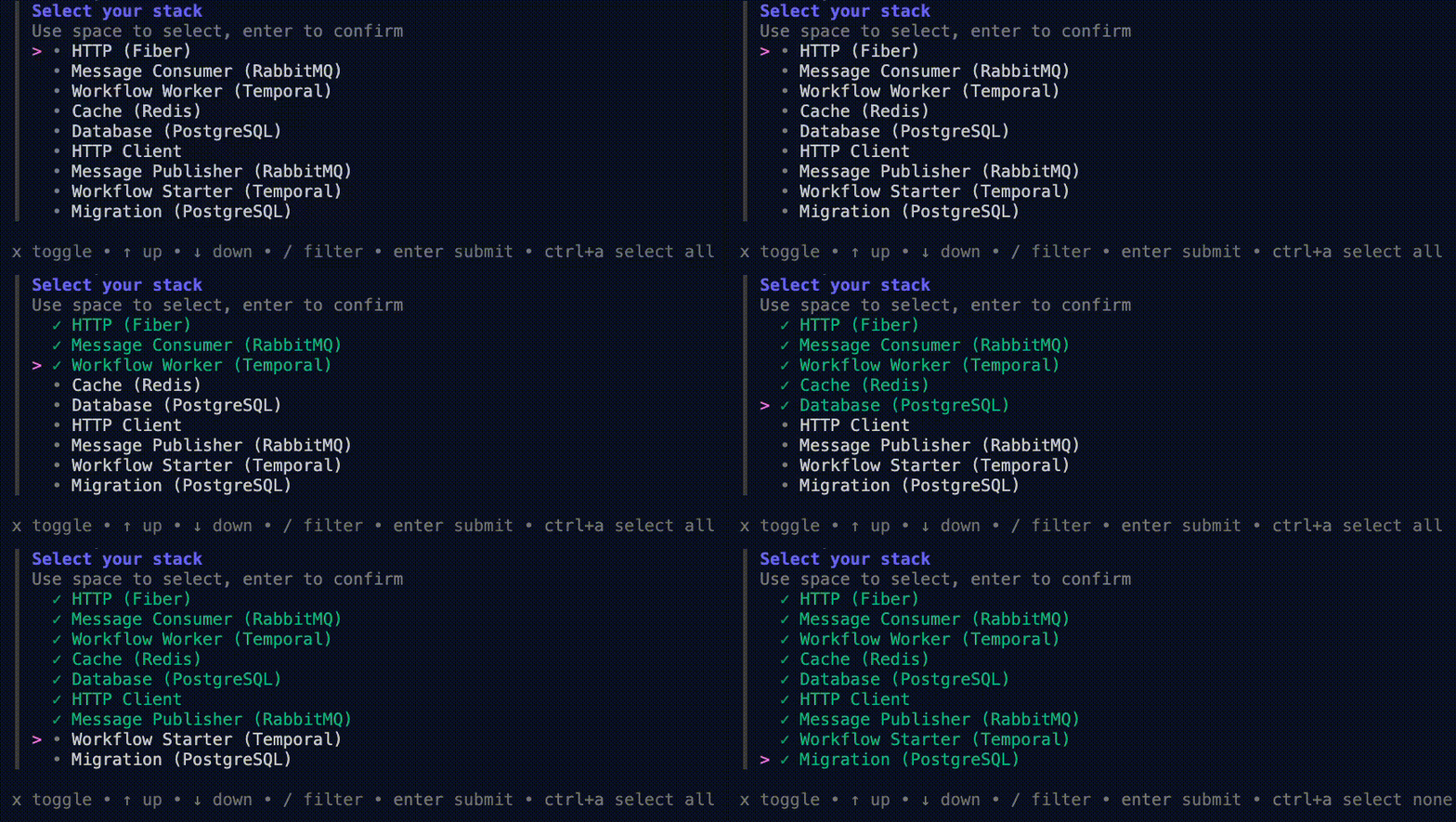
After the cloning is complete, you will be prompted to select your preferred stack. Choose the components you want to include in your project:
# Setup the project
cd my-project-name
cp .env.example .env
cp .env.docker.example .env.docker
go mod tidy
docker-compose --env-file .env.docker up -d
Running the Application
You have several options to run your Prabogo application:
# Using the interactive command selector
prabogo-cli run

# Running in HTTP server mode
prabogo-cli http

# Running in message consumer mode
prabogo-cli message upsert_client

# Executing a specific command
prabogo-cli command publish_upsert_client name

# Running directly without CLI
go run cmd/main.go http
Architecture
Prabogo uses Hexagonal Architecture (also known as Ports and Adapters pattern) to keep the business logic separate from external dependencies like databases, UI frameworks, and messaging systems.

Key Components
- Port: Interface defining how the application communicates with the outside world.
- Adapter: Component implementing a port to connect external systems or technologies to the core.
- Domain: Core business logic and rules, independent of external systems or frameworks.
- Application: Layer that coordinates activities and orchestrates domain logic.
- MCP Client: External tools can invoke application capabilities through the inbound MCP adapter.
This architecture allows you to:
- Replace infrastructure components with minimal changes
- Test business logic in isolation
- Develop features without being constrained by external dependencies
- Maintain a clean separation of concerns
CLI Commands
Prabogo provides a comprehensive CLI with various helpful commands for code generation and development tasks.
Interactive Command Runner
You can use the interactive target selector to choose and run targets:
prabogo-cli run
Code Generation Commands
-
prabogo-cli model nameCreates a model/entity with necessary structures
-
prabogo-cli migration-postgres nameCreates a PostgreSQL migration file
-
prabogo-cli inbound-http-fiber nameCreates HTTP handlers using Fiber framework
-
prabogo-cli inbound-message-rabbitmq nameCreates RabbitMQ message consumers
-
prabogo-cli inbound-command nameCreates command line interface handlers
-
prabogo-cli inbound-mcp nameCreates an MCP tool adapter for Model Context Protocol clients
-
prabogo-cli inbound-workflow-temporal nameCreates Temporal workflow worker
-
prabogo-cli outbound-database-postgres nameCreates PostgreSQL database adapter
-
prabogo-cli outbound-http nameCreates HTTP adapter
-
prabogo-cli outbound-message-rabbitmq nameCreates RabbitMQ message publisher adapter
-
prabogo-cli outbound-cache-redis nameCreates Redis cache adapter
-
prabogo-cli outbound-workflow-temporal nameCreates Temporal workflow starter adapter
-
prabogo-cli generate-mocksGenerates mock implementations from all go:generate directives in registry files
Runtime Commands
-
prabogo-cli buildBuilds the Docker image for the application
-
prabogo-cli httpRuns the application in HTTP server mode inside Docker
-
prabogo-cli message upsert_clientRuns the application in message consumer mode inside Docker
-
prabogo-cli command publish_upsert_client nameExecutes a specific command in the application
-
prabogo-cli workflow upsert_clientRuns the application in workflow worker mode inside Docker
Development Workflow
A typical development workflow in a Prabogo project follows these steps:
-
Create Models
Define your domain models that represent your business entities:
prabogo-cli model product -
Create Database Migrations
Define database schema for your models:
prabogo-cli migration-postgres product -
Implement Domain Logic
Add your business logic in the domain layer, focusing on the core functionality without external dependencies.
-
Create Inbound Adapters
Create adapters for handling incoming requests:
# For HTTP endpoints prabogo-cli inbound-http-fiber product # For message consumers prabogo-cli inbound-message-rabbitmq product # For CLI commands prabogo-cli inbound-command product # For MCP tools prabogo-cli inbound-mcp product # For Temporal workflows prabogo-cli inbound-workflow-temporal product -
Create Outbound Adapters
Create adapters for external dependencies:
# For database access prabogo-cli outbound-database-postgres product # For HTTP clients prabogo-cli outbound-http product_api # For cache prabogo-cli outbound-cache-redis product # For Temporal workflows prabogo-cli outbound-workflow-temporal product -
Write Tests
Write tests for your domain logic and generate mocks for your ports:
prabogo-cli generate-mocks -
Run the Application
Start your application in the appropriate mode:
# Start your application in the appropriate mode:
prabogo-cli http

# Or run in workflow worker mode
prabogo-cli workflow product_workflow
Code Generation
Prabogo provides powerful code generation capabilities to streamline development. When you use the CLI commands to generate code, Prabogo creates:
- Appropriate interfaces (ports) in the port directory
- Implementation files in the adapter directory
- Necessary registrations in registry files
- Tests and mocks as needed
This ensures consistency across your codebase and reduces the boilerplate code you need to write.
Testing
Prabogo promotes writing unit tests for your domain logic. The hexagonal architecture makes it easy to test your business logic in isolation by mocking external dependencies.
Running Tests
# Run unit tests
go test -cover ./internal/domain/...

# Generate coverage report
go test -coverprofile=coverage.profile -cover ./internal/domain/...
go tool cover -html coverage.profile -o coverage.html

# Check for intermittent test failures
retry -d 0 -t 100 -u fail -- go test -coverprofile=coverage.profile -cover ./internal/domain/... -count=1
Deployment
Prabogo projects come with Docker support out of the box, making deployment straightforward:
Building a Docker Image
prabogo-cli buildDeployment Options
You can deploy your Prabogo application in various ways:
- Docker Compose: Ideal for development and simple deployments
- Kubernetes: For container orchestration in production
- Cloud Platforms: Deploy to AWS, GCP, or Azure with their respective container services
AI Agent Workflow
Prabogo now uses Spec Kit to support spec-driven development with AI agents. The project provides a structured workflow for defining principles, writing specs, planning work, generating tasks, and implementing changes with your preferred supported AI agent.
Spec Kit Integration
Spec Kit is initialized in this repository and currently configured for GitHub Copilot by default. It adds project files under .specify/ and agent integration files under .github/ so development can follow a clear, repeatable workflow.
With Spec Kit, you can guide AI-assisted development through these generated commands:
/speckit.constitution
/speckit.specify
/speckit.plan
/speckit.tasks
/speckit.implement
For a concrete end-to-end example, see the Spec Kit detailed example: Building Taskify.
This workflow helps teams:
- Define requirements before implementation starts
- Break features into explicit plans and tasks
- Keep AI-assisted development aligned with project architecture
- Use the same process across different supported AI tools
Installing Specify CLI
Spec Kit requires Python 3.11 or newer and assumes uv is already installed.
uv tool install specify-cli --from git+https://github.com/github/spec-kit.git@v0.8.4
specify version
Reinitialize Spec Kit
If you need to refresh the generated Spec Kit files in your project, run:
specify init . --integration copilotYou can also switch to another supported AI integration when needed:
specify integration list

# Example: switch integration
specify init . --force --integration claude
Entire.io Checkpoints
Prabogo also recommends Entire.io to capture context from AI agent-assisted development. Entire records prompts, decisions, and iterations on a separate Git branch so you can preserve session context without cluttering the main project history.
Entire is useful when you want to:
- Capture full development context alongside code changes
- Help teammates understand why a change was made
- Resume interrupted AI sessions more easily
- Keep checkpoint history separate from your main commit history
Quick start:
entire enableTo inspect captured sessions and explanations later:
entire sessions list
entire explain -c <checkpoint-id>Best Practices
Project Structure
Follow the provided directory structure to maintain a clean organization:
cmd/: Application entry pointsinternal/: Application code not meant to be imported by other projectsdomain/: Core business logic and rulesport/: Interfaces defining how the application communicatesadapter/: Implementations of the ports connecting to external systemsmodel/: Data structures and entitiesmigration/: Database migration scripts
utils/: Utility functions and helperstests/: Test helpers and mocks
Domain-Driven Design
Prabogo works well with DDD principles:
- Keep business logic in the domain layer
- Use domain models to represent business entities
- Define clear boundaries between different domains
- Use domain events for communication between domains
Testing
- Write unit tests for all domain logic
- Use mocks for external dependencies
- Aim for high test coverage of domain code
- Consider integration tests for adapter implementations